KEDA Auto-Scaler for inference workloads
- Feature status: Alpha
Introduction
LLM inference service is a basic and widely used feature in KAITO. As the number of waiting inference requests increases, you should scale more inference instances to prevent blocking. Conversely, reduce inference instances when requests decline to improve GPU resource utilization. Kubernetes Event Driven Autoscaling (KEDA) is well-suited for inference pod autoscaling. It enables event-driven, fine-grained scaling based on external metrics and triggers. KEDA supports a wide range of event sources (like custom metrics), allowing pods to scale precisely in response to workload demand. This flexibility and extensibility make KEDA ideal for dynamic, cloud-native applications that require responsive and efficient autoscaling.
To enable intelligent autoscaling for KAITO inference workloads using service monitoring metrics, utilize the following components and features:
-
KEDA KAITO Scaler: A dedicated KEDA external scaler, eliminating the need for external dependencies such as Prometheus.
-
KAITO
InferenceSetCustomResourceDefinition (CRD) and controller: A new CRD and controller were built on top of the KAITO workspace for intelligent autoscaling, introduced as an alpha feature in KAITO v0.8.0 and promoted to beta in v0.11.0 (enabled by default).
Architecture
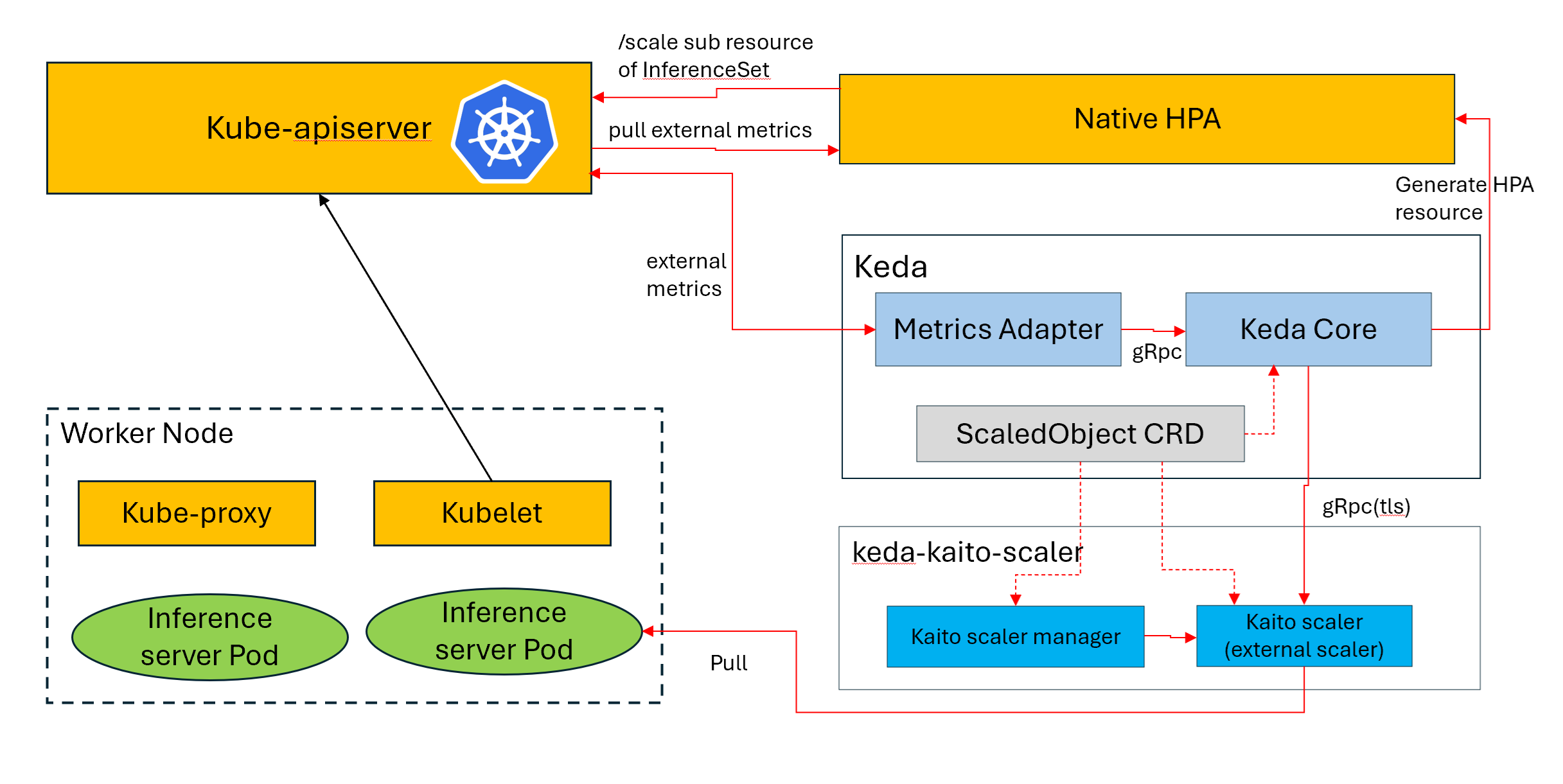
The following diagram shows how KEDA KAITO Scaler integrates KAITO InferenceSet with KEDA to autoscale inference workloads on AKS:
Getting started
Install KEDA
The following example demonstrates how to install KEDA 2.x using Helm chart. For instructions on installing KEDA through other methods, refer to the KEDA deployment documentation.
export KEDA_NAMESPACE=kaito-workspace
helm repo add kedacore https://kedacore.github.io/charts
helm install keda kedacore/keda --namespace $KEDA_NAMESPACE --create-namespace
Enable InferenceSet controller during KAITO install
This feature is available starting from KAITO v0.8.0. Starting from KAITO v0.11.0, the InferenceSet feature has been promoted to beta and enableInferenceSetController is enabled by default — no additional feature gate is needed.
KAITO v0.11.0+
export CLUSTER_NAME=kaito

helm repo add kaito https://kaito-project.github.io/kaito/charts/kaito
helm repo update
helm upgrade --install kaito-workspace kaito/workspace \
  --namespace kaito-workspace \
  --create-namespace \
  --set clusterName="$CLUSTER_NAME" \
  --wait \
  --take-ownership
KAITO v0.8.0 – v0.10.x
For older versions, you need to explicitly enable the InferenceSet Controller:
export CLUSTER_NAME=kaito

helm repo add kaito https://kaito-project.github.io/kaito/charts/kaito
helm repo update
helm upgrade --install kaito-workspace kaito/workspace \
  --namespace kaito-workspace \
  --create-namespace \
  --set clusterName="$CLUSTER_NAME" \
  --set featureGates.enableInferenceSetController=true \
  --wait \
  --take-ownership
Example Scenarios
Time-Based KEDA Scaler
The KEDA cron scaler enables scaling of workloads according to time-based schedules, making it especially beneficial for workloads with predictable traffic patterns. It is perfect for situations where peak hours are known ahead of time, allowing you to proactively adjust resources before demand rises. For more details about time-based scalers, refer to Scale applications based on a cron schedule.
Example: Business Hours Scaling
- Create a KAITO InferenceSet for running inference workloads
The following example creates an InferenceSet for the phi-4-mini model:
cat <<EOF | kubectl apply -f -
apiVersion: kaito.sh/v1alpha1
kind: InferenceSet
metadata:
  name: phi-4-mini
  namespace: default
spec:
  labelSelector:
    matchLabels:
      apps: phi-4-mini
  replicas: 1
  template:
    metadata:
      labels:
        apps: phi-4-mini
    inference:
      preset:
        accessMode: public
        name: microsoft/Phi-4-mini-instruct
    resource:
      instanceType: Standard_NC24ads_A100_v4
EOF
- Create a KEDA ScaledObject
Below is an example of creating a ScaledObject that scales a KAITO InferenceSet based on business hours:
-
Scale up to 5 replicas from 6:00 AM to 8:00 PM (peak hours)
-
Scale down to 1 replica otherwise (off-peak hours)
cat <<EOF | kubectl apply -f -
apiVersion: keda.sh/v1alpha1
kind: ScaledObject
metadata:
  name: kaito-business-hours-scaler
  namespace: default
spec:
  # Target KAITO InferenceSet to scale
  scaleTargetRef:
    apiVersion: kaito.sh/v1alpha1
    kind: InferenceSet
    name: phi-4-mini
  # Scaling boundaries
  minReplicaCount: 1
  maxReplicaCount: 5
  # Cron-based triggers for time-based scaling
  triggers:
  # Scale up to 5 replicas at 6:00 AM (start of business hours)
  - type: cron
    metadata:
      timezone: "America/New_York"  # Adjust timezone as needed
      start: "0 6 * * 1-5"          # 6:00 AM Monday to Friday
      end: "0 20 * * 1-5"           # 8:00 PM Monday to Friday
      desiredReplicas: "5"          # Scale to 5 replicas during business hours
  # Scale down to 1 replica at 8:00 PM (end of business hours)
  - type: cron
    metadata:
      timezone: "America/New_York"  # Adjust timezone as needed
      start: "0 20 * * 1-5"         # 8:00 PM Monday to Friday
      end: "0 6 * * 1-5"            # 6:00 AM Monday to Friday (next day)
      desiredReplicas: "1"          # Scale to 1 replica during off-hours
EOF
Metric-Based KEDA Scaler
Install KEDA KAITO Scaler
This component is required only when using metric-based KEDA scaler. Ensure that KEDA KAITO Scaler is installed within the same namespace as KEDA.
helm repo add keda-kaito-scaler https://kaito-project.github.io/keda-kaito-scaler/charts/kaito-project
helm upgrade --install keda-kaito-scaler -n $KEDA_NAMESPACE keda-kaito-scaler/keda-kaito-scaler --create-namespace
After a few seconds, the keda-kaito-scaler deployment starts.
# kubectl get deployment keda-kaito-scaler -n $KEDA_NAMESPACE
NAME                READY   UP-TO-DATE   AVAILABLE   AGE
keda-kaito-scaler   1/1     1            1           28h
The keda-kaito-scaler provides a simplified configuration interface for scaling vLLM inference workloads. It directly scrapes metrics from inference pods, eliminating the need for a separate monitoring stack.
Example: Create a KAITO InferenceSet with annotations for running inference workloads
-
The following example creates an InferenceSet for the phi-4-mini model, using annotations with the prefix
scaledobject.kaito.sh/to supply parameter inputs for the KEDA KAITO scaler.scaledobject.kaito.sh/auto-provision(required): When set totrue, the KEDA KAITO scaler automatically provisions a ScaledObject based on theInferenceSetobject.scaledobject.kaito.sh/max-replicas(required): Maximum number of replicas for the target InferenceSet.scaledobject.kaito.sh/metricName(optional): Specifies the metric name collected from the vLLM pod, which is used for monitoring and triggering the scaling operation. The default isvllm:num_requests_waiting. For all vLLM metrics, see vLLM Production Metrics.scaledobject.kaito.sh/threshold(required): Specifies the threshold for the monitored metric that triggers the scaling operation.
cat <<EOF | kubectl apply -f -
apiVersion: kaito.sh/v1alpha1
kind: InferenceSet
metadata:
  annotations:
    scaledobject.kaito.sh/auto-provision: "true"
    scaledobject.kaito.sh/max-replicas: "5"
    scaledobject.kaito.sh/metricName: "vllm:num_requests_waiting"
    scaledobject.kaito.sh/threshold: "10"
  name: phi-4-mini
  namespace: default
spec:
  labelSelector:
    matchLabels:
      apps: phi-4-mini
  replicas: 1
  template:
    metadata:
      labels:
        apps: phi-4-mini
    inference:
      preset:
        accessMode: public
        name: microsoft/Phi-4-mini-instruct
    resource:
      instanceType: Standard_NC24ads_A100_v4
EOF
In just a few seconds, the KEDA KAITO scaler automatically creates the scaledobject and hpa objects. After a few minutes, once the inference pod runs, the KEDA KAITO scaler begins scraping metric values from the inference pod. The system then marks the status of the scaledobject and hpa objects as ready.
# kubectl get scaledobject
NAME           SCALETARGETKIND                  SCALETARGETNAME   MIN   MAX   READY   ACTIVE    FALLBACK   PAUSED   TRIGGERS   AUTHENTICATIONS           AGE
phi-4-mini     kaito.sh/v1alpha1.InferenceSet   phi-4-mini        1     5     True    True     False      False    external   keda-kaito-scaler-creds   10m

# kubectl get hpa
NAME                    REFERENCE                   TARGETS      MINPODS   MAXPODS   REPLICAS   AGE
keda-hpa-phi-4-mini     InferenceSet/phi-4-mini     0/10 (avg)   1         5         1          11m
That's it! Your KAITO workloads will now automatically scale based on the average number of waiting inference requests(vllm:num_requests_waiting) across all workloads associated with InferenceSet/phi-4-mini in the cluster.
In the example below, if vllm:num_requests_waiting exceeds the threshold (10) for over 60 seconds, KEDA scales up by adding a new replica to InferenceSet/phi-4-mini. Conversely, if vllm:num_requests_waiting remains below the threshold (10) for more than 300 seconds, KEDA scales down the number of replicas.
Every 2.0s: kubectl describe hpa
Name:                                                     keda-hpa-phi-4-mini
Namespace:                                                default
Labels:                                                   app.kubernetes.io/managed-by=keda-operator
                                                          app.kubernetes.io/name=keda-hpa-phi-4-mini
                                                          app.kubernetes.io/part-of=phi-4-mini
                                                          app.kubernetes.io/version=2.18.1
                                                          scaledobject.keda.sh/name=phi-4-mini
Annotations:                                              scaledobject.kaito.sh/managed-by: keda-kaito-scaler
CreationTimestamp:                                        Tue, 09 Dec 2025 03:35:09 +0000
Reference:                                                InferenceSet/phi-4-mini
Metrics:                                                  ( current / target )
  "s0-vllm:num_requests_waiting" (target average value):  58 / 10
Min replicas:                                             1
Max replicas:                                             5
Behavior:
  Scale Up:
    Stabilization Window: 60 seconds
    Select Policy: Max
    Policies:
      - Type: Pods  Value: 1  Period: 300 seconds
  Scale Down:
    Stabilization Window: 300 seconds
    Select Policy: Max
    Policies:
      - Type: Pods  Value: 1  Period: 600 seconds
InferenceSet pods:  2 current / 2 desired
Conditions:
  Type            Status  Reason            Message
  ----            ------  ------            -------
  AbleToScale     True    ReadyForNewScale  recommended size matches current size
  ScalingActive   True    ValidMetricFound  the HPA was able to successfully calculate a replica count from external metric s0-vllm:num_requests_waiting(&Lab
elSelector{MatchLabels:map[string]string{scaledobject.keda.sh/name: phi-4-mini,},MatchExpressions:[]LabelSelectorRequirement{},})
  ScalingLimited  True    ScaleUpLimit      the desired replica count is increasing faster than the maximum scale rate
Events:
  Type    Reason             Age   From                       Message
  ----    ------             ----  ----                       -------
  Normal  SuccessfulRescale  33s   horizontal-pod-autoscaler  New size: 2; reason: external metric s0-vllm:num_requests_waiting(&LabelSelector{MatchLabels:ma
p[string]string{scaledobject.keda.sh/name: phi-4-mini,},MatchExpressions:[]LabelSelectorRequirement{},}) above target
Example: Scale to zero
Scale to zero requires KEDA KAITO Scaler v0.7.0+ and KAITO v0.13.0+. The initialcooldownperiod annotation and the cooldown defaults described below require KEDA KAITO Scaler v0.7.1+. For the full annotation reference, see the KEDA KAITO Scaler README.
By default, the KEDA KAITO scaler keeps at least one inference replica running. Setting the scaledobject.kaito.sh/min-replicas annotation to "0" lets an InferenceSet release its GPU capacity entirely while idle (1 → 0) and reacquire it when new requests arrive (0 → 1). Scaling between 1 and the maximum replica count is unchanged.
At zero replicas there are no inference pods to scrape, so the wake-up signal must come from the Endpoint Picker (EPP), the inference gateway's router, which keeps running while the workload is parked at zero. KAITO creates the EPP only when all of the following conditions are met:
- KAITO is installed with the
gatewayAPIInferenceExtensionfeature gate enabled. See Gateway API Inference Extension. - The InferenceSet uses the vLLM runtime with a preset inference template.
- At least one Workspace exists for the InferenceSet. Until an EPP pod is running, metric requests for EPP-sourced metrics fail and KEDA keeps the current replica count.
Request-driven wake-up also requires the enableEPPFlowControl feature gate, which is disabled by default. It enables request buffering in the EPP and the flow-control queue metric (llm_d_epp_flow_control_queue_size) used in the example below. To enable it, add --set featureGates.enableEPPFlowControl=true to the KAITO Helm install command.
-
Scale to zero is configured with the
scaledobject.kaito.sh/metricsannotation, a YAML list with one entry per metric. Each entry sets aname, atype(gaugeorhistogram), an optionalsource(modelpodby default, which scrapes the inference pods, orepp), and the following thresholds:activationthreshold: Wakes the workload from zero when any metric exceeds its activation threshold. At least one metric must declare it. It's only valid onsource: eppmetrics and must be paired with adeactivationthresholdon the same metric.deactivationthreshold: Parks the workload at zero when every metric that declares one is at or below its deactivation threshold. At least onemodelpodmetric must declare it, so that the workload isn't parked while a replica is still generating tokens. When paired with anactivationthreshold, it must not exceed it.upthreshold/downthreshold: Scale between 1 and the maximum replica count, one replica at a time. With scale to zero, these are optional per metric but must be declared together.
-
The following global annotations also apply:
scaledobject.kaito.sh/min-replicas: Set to"0"to enable scale to zero.scaledobject.kaito.sh/max-replicas: Maximum number of replicas for the target InferenceSet. Must be at least1.scaledobject.kaito.sh/cooldownperiod(optional): Seconds that KEDA waits after the last active trigger reading before scaling the InferenceSet to zero. The default is1800. Only valid whenmin-replicasis"0".scaledobject.kaito.sh/initialcooldownperiod(optional): Seconds afterScaledObjectcreation that KEDA waits before scaling the InferenceSet to zero, used until the workload has been active for the first time. It doesn't delay the initial scale-up. The default is1800. Only valid whenmin-replicasis"0".
cat <<EOF | kubectl apply -f -
apiVersion: kaito.sh/v1beta1
kind: InferenceSet
metadata:
  annotations:
    scaledobject.kaito.sh/auto-provision: "true"
    scaledobject.kaito.sh/min-replicas: "0"
    scaledobject.kaito.sh/max-replicas: "5"
    # Wait 10 minutes of idleness before releasing the GPU.
    scaledobject.kaito.sh/cooldownperiod: "600"
    scaledobject.kaito.sh/metrics: |
      # 0 -> 1: any request queued at the EPP wakes the workload.
      - name: llm_d_epp_flow_control_queue_size
        type: gauge
        source: epp
        activationthreshold: 0
        deactivationthreshold: 0
      # 1 -> 0: park only once the inference pods are idle.
      # 1 <-> N: the usual up/down thresholds.
      - name: vllm:num_requests_running
        type: gauge
        deactivationthreshold: 0
        upthreshold: 10
        downthreshold: 2
  name: phi-4-mini
  namespace: default
spec:
  labelSelector:
    matchLabels:
      apps: phi-4-mini
  replicas: 1
  template:
    inference:
      preset:
        accessMode: public
        name: microsoft/Phi-4-mini-instruct
    resource:
      instanceType: Standard_NC24ads_A100_v4
EOF
With this configuration:
- While the InferenceSet is at zero replicas, a request buffered in the EPP (
llm_d_epp_flow_control_queue_sizeabove0) scales it from 0 to 1. - While it's running, the InferenceSet scales up by one replica when the average
vllm:num_requests_runningper replica is above10and all current replicas are ready, and scales down by one replica when it's below2. - When the EPP queue is empty and no inference pod is running a request, the InferenceSet scales down to zero after the
cooldownperiod(600 seconds) has passed since the last active trigger reading.
Keep the following wake-up behavior in mind when choosing thresholds and cooldowns:
- With an
activationthresholdof0, a buffered request observed by the scaler wakes the workload. With a thresholdTgreater than0, more thanTrequests must be buffered when the scaler reads the metric. This is a queue-depth threshold, not a minimum request rate: bursts can trigger activation even with low average traffic. For steady arrivals buffered for the full request time-to-live (TTL),T / TTLapproximates the rate needed to accumulate that backlog; earlier request-context cancellation can prevent activation even at higher rates. Use0unless you deliberately want to wait for more buffered demand before acquiring a GPU. - Cold start isn't instant: the workload has to acquire a GPU node, pull the model, and become ready. Whether the request that triggered the wake-up is served depends on the client's timeout and the gateway's request buffering configuration.
- The workload can scale back to zero before the GPU is ready. Until KAITO creates the model Service, which happens after the node is provisioned,
modelpodmetrics report0, so only the EPP queue keeps the workload active. Requests can leave the queue on TTL expiry or request-context cancellation, including gateway timeouts. If the queue falls to or below its deactivation threshold, KEDA can scale the workload to zero oncecooldownperiodhas passed since the last active trigger reading. Setcooldownperiodto at least the worst-case node provisioning time. cooldownperiodapplies only after the workload has been active once. Before that, KEDA usesinitialcooldownperiod, counted fromScaledObjectcreation, so a newly deployed InferenceSet that receives no traffic scales to zero once it elapses. Set it to at least the worst-case time to provision the first GPU node.
- InferenceSets owned by a
MultiRoleInferencearen't supported. The KEDA KAITO scaler doesn't create aScaledObjectfor them. - To turn off scale to zero, set
min-replicasto1or higher (or remove it), removecooldownperiodandinitialcooldownperiod, remove everyactivationthresholdanddeactivationthreshold, and give every remaining metric anupthreshold/downthresholdpair, all in the same update. Until all of these changes are in place, the configuration is invalid: the scaler records anInvalidConfigwarning event on the InferenceSet and keeps the existingScaledObject. If the workload is parked at zero and doesn't come back up, setspec.replicason the InferenceSet to the new minimum.
Summary
KAITO's LLM inference service must scale inference instances dynamically to handle varying numbers of waiting requests: scaling up to prevent blocking when requests increase, and scaling down to optimize GPU usage when requests decrease. With the newly introduced InferenceSet CRD and KEDA KAITO scaler, configuring this setting in KAITO has become much simpler. With scale to zero, idle inference workloads can also release their GPU capacity entirely and reacquire it when new requests arrive.